
Apple Notes AI: what Apple Intelligence does in Notes

Apple Notes has AI built in, spread across Writing Tools, recordings and Siri. Here's what each part does in Notes today, what your iPhone or Mac needs for it, and the one thing it still doesn't do.

What Apple Intelligence does in Notes
| Feature | What it does in a note | Where |
|---|---|---|
| Writing Tools | Proofread, rewrite (Friendly, Professional or Concise), summarize, pull out key points, or describe a change | iPhone and Mac |
| Audio transcript | Writes down what's said while you record; you can search it or add it to the note | iPhone 12 and later, Mac with M1 or later |
| Recording summary | Sums up a recording's transcript; you can copy or share it | iPhone and Mac with Apple Intelligence |
| Call recordings | Saves a recorded phone call to a Call Recordings folder, with a transcript and a summary | iPhone, in some countries |
| Image Wand | Turns a rough sketch, or the text around an empty space, into a picture | iPhone |
| Siri AI (beta) | Finds notes, searches inside them, edits them, and writes with you | iPhone and Mac, iOS 27 and macOS 27 |
Transcripts themselves don't need Apple Intelligence: an iPhone 12 transcribes. The summary of a transcript does. If you use Siri AI, Apple points you to Write with Siri for rewriting instead of Writing Tools; Siri AI and Apple Notes covers what Siri does with your notes.
Rewrite or summarize text
- iPhone
- Mac
Then pick Proofread, Rewrite, Summarize or Key Points, or type what you want under Describe a change. With Apple's ChatGPT extension turned on, Compose in the same panel asks ChatGPT to write, using the whole note or only the selected text.
Record, transcribe and summarize
- In a note, tap the Attachment button (on a Mac, click it in the toolbar), then Record Audio, and start recording. You can keep typing in the note while it records.
- When you're done, open the recording (double-click it on a Mac) and tap the transcript button. Find in Transcript searches it; Add Transcript to Note puts the text in the note.
- For the summary, open the recording and choose Summary. The button at the top of the summary copies or shares it.
Deleting the recording deletes its transcript too. Phone calls you record on iPhone land in the Call Recordings folder, with the speaker of each line identified in the transcript, and a Summary button. Call recording isn't available in the EU and some other countries, and the other person hears that the call is being recorded.
Which devices and languages
- iPhone: iPhone 15 Pro, iPhone 15 Pro Max, iPhone 16 or later, iPhone Air or iPhone Duo, with iOS 27.
- Mac: any Mac with M1 or later, or the MacBook Neo, with macOS 27.
- Language: your device language and Siri language set to the same supported language. Apple lists English, Danish, Dutch, French, German, Italian, Norwegian, Portuguese, Spanish, Swedish, Turkish, Vietnamese, Chinese (simplified and traditional), Japanese and Korean.
- Space: up to 8 GB of storage, and up to 14 GB on some newer models.
On those devices Apple Intelligence comes with the 27.0 update. It doesn't work on devices bought in China mainland. Some features use Apple's servers and have daily limits, and Apple's Notes pages say usage limits may apply. Recording summaries have a shorter language list than the rest: English, French, German, Italian, Japanese, Korean, Portuguese (Brazil), Spanish and traditional Chinese, each in the regions Apple names. Siri AI is a beta in English, French, Japanese, Korean, Portuguese and Spanish, and in the EU it's on the Mac but not on iPhone.
Is there AI search in Apple Notes?
Notes' own search already goes further than words: it finds typed and handwritten text, objects in pictures, text in scanned documents and tags. A locked note only shows its title in the results. Within one note, Find in Note searches the text, and PDFs and other attachments too if you choose Include Attachments.
The AI part is Siri AI. In iOS 27 you can ask it something like “What was the note with the cookie recipe?” and it looks through what your notes say, so you don't need the title. Notes is one of the apps it draws on, with Messages, Mail, Calendar and Reminders.
What it can't do: ChatGPT and Claude
Apple Intelligence works on the note in front of you, on that device. The AI you plan your week with can't open your notes. Apple's ChatGPT extension only gets what you choose to send it, such as the text you selected, and the answer comes back in Writing Tools or Siri. Apple offers no such extension for Claude, and Apple Notes has no API other apps could use.
On a Mac there are workarounds. The ChatGPT app can read the note you have open. Claude's desktop app can read and write notes through an extension that drives the Notes app; can Claude read your Apple Notes? has the details and the catches. Both stop at that Mac: from ChatGPT on your phone or Claude on the web, your notes aren't there.
When you want ChatGPT or Claude in your notes
Pinto Notes is a notes app for iPhone and Mac that looks and works like Apple Notes, with folders, checklists, tables and pinned notes. It has no AI of its own. Instead, the ChatGPT or Claude you already use can search, read and edit your notes, from the web, the desktop apps or your phone, and Claude Code and Codex can too. Connecting one takes a minute: see connect ChatGPT or Claude to your notes.
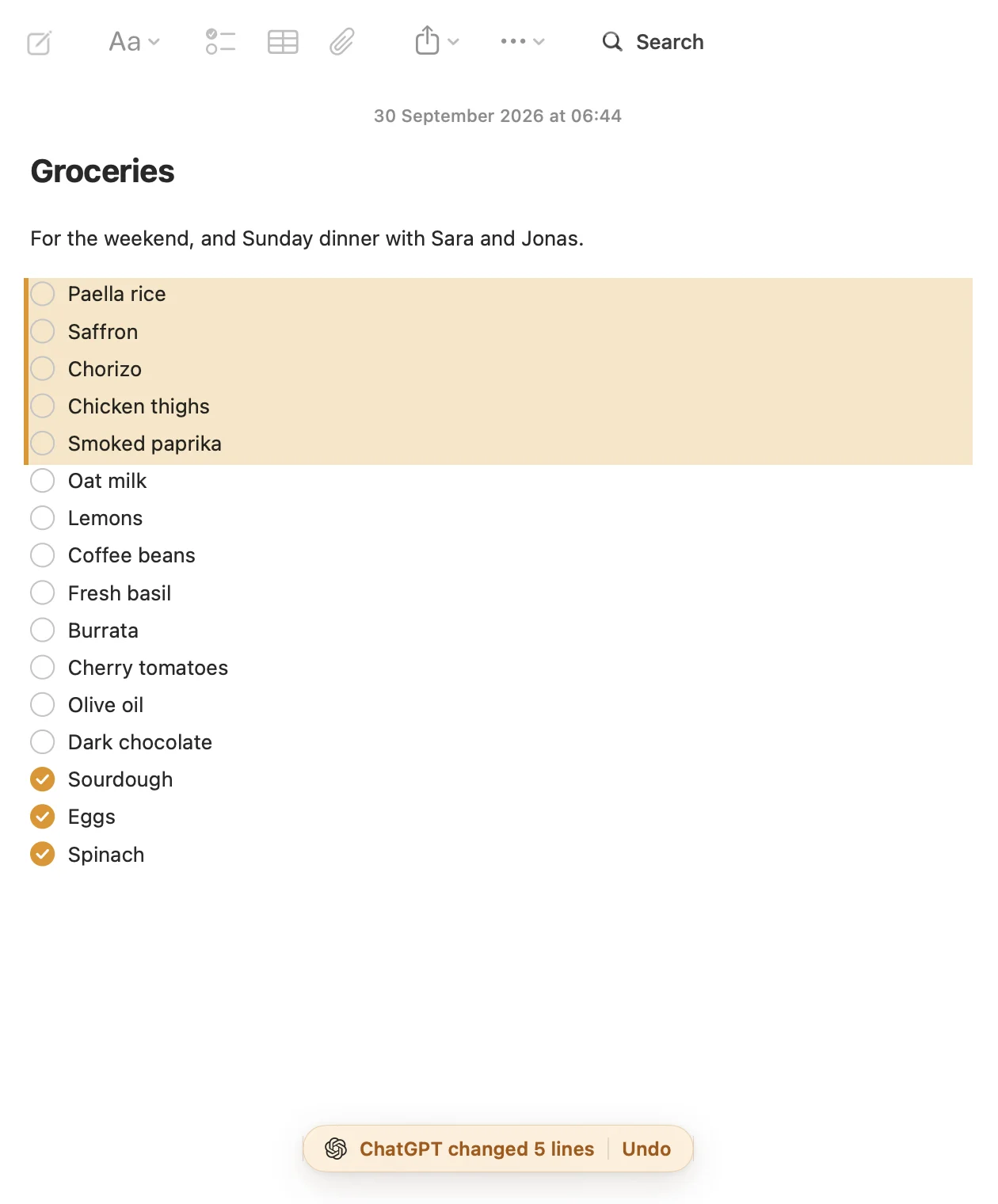
- Every change an AI makes is tinted, with Undo, and every earlier version of a note is kept.
- Notes are Markdown files, so an AI reads them as plain text, checklists and tables included.
- Notes are encrypted, and locked notes stay closed to AI.
It's for iPhone and Mac only, with no Windows, Android or web app. Your Apple Notes come over in one import on your Mac, with their folders, and Apple Notes isn't changed.
Questions
Does Apple Notes have an AI summary?
Yes, in two places. A recording in a note gets a Summary of its transcript, and Writing Tools can summarize or pull key points out of text you select. Both need Apple Intelligence: an iPhone 15 Pro or later, or a Mac with M1 or later, in a supported language.
Which languages can Apple Notes transcribe?
On iPhone, Apple lists English, Spanish, Portuguese, Italian, French, German, Japanese, Korean, Simplified Chinese and Traditional Chinese, on iPhone 12 and later. The Mac needs M1 or later and has nearly the same list. Summaries of those transcripts have their own, slightly different list.
Why don't I see a transcript for my recording in Notes?
Apple gives two reasons: the iPhone or Mac doesn't meet the minimum requirements, or Notes didn't detect a supported language. A call transcript can also take a moment; Notes says when it's still in progress.
Does Apple Intelligence send my notes to Apple?
Apple says many requests run entirely on your device. Bigger ones can go to Private Cloud Compute, where the data isn't stored or made accessible to Apple. On iPhone, Settings, Privacy & Security, Apple Intelligence Report lists what was sent.
Checked against the app on .


