Siri AI and Apple Notes: what it can do with your notes

On 13 October Apple announced a new Apple TV 4K "supercharged by Siri AI", and HomeView, a home display built around it. The same Siri AI has been on iPhone and Mac since iOS 27 and macOS 27 came out on 14 September. If you keep your life in Apple Notes, the useful question is what it can do with your notes. This guide sticks to Apple's own pages, and says where they're silent.
What Siri AI is, and where you get it
Siri AI is Apple's new version of Siri. Apple's announcement on 14 September describes it as more conversational, with personal context, broad world knowledge, awareness of what's on your screen and more actions in apps. Apple built it in collaboration with Google and its Gemini models. You can type to it as well as talk, and a new Siri app keeps your conversations.
It's a beta in iOS 27, macOS 27, watchOS 27 and visionOS 27. Apple's How to get Siri AI page lists the devices. On iPhone that's iPhone 15 Pro, iPhone 15 Pro Max, iPhone Air and any iPhone 16 or later; on a Mac, any Mac with M1 or later and the MacBook Neo. Apple TV 4K (2nd generation or later) gets it in tvOS 27.2, and the new Apple TV 4K and HomeView ship with it on 13 November.
Apple said in September that French, Japanese, Korean, Portuguese and Spanish would follow in October. On 14 October its support pages still say English to start. Siri AI isn't available on iPhone or Apple Watch in the EU, though a Mac in the EU gets it when the Mac and Siri are both set to English. Requests that use Apple's server models count against a daily limit, and Apple says expanded access will cost a fee later.
How to turn on Siri AI
- Update firstInstall iOS 27 or macOS 27, and set the device language and Siri's language to English.
- Open Settings, then SiriTap Try Siri AI (Beta). If Siri is off, tap Turn on Siri first.
- Follow the setupYou pick a voice, train it on your voice and review the privacy settings. That puts you on a waitlist, and the download starts on its own when your turn comes.
What Siri AI can do with Apple Notes
Apple spreads this over several pages. Put together, there are four things Siri AI does with your notes.
Siri AI can find your notes. Use Notes on your iPhone says that in iOS 27 you can ask Siri AI to search for notes or search within notes, and gives the example "What was the note with the cookie recipe?" Apple's How to get Siri AI page also lists Notes, with Messages, Mail, Calendar and Reminders, among the apps Siri AI looks through when a question needs your personal context.
Siri AI can also work on the note in front of you. Apple's page on asking Siri about your screen uses "Explain this from my class notes" with a diagram open in Notes. Write with Siri lists proofreading, rewriting, feedback and summaries, and its examples could have come from a notes app.
Requests from Apple's own pages to try in Notes
What was the note with the cookie recipe?
Proofread this.
Tidy up the recipe I wrote down from my cooking class and format it step by step.
Condense these meeting notes to give me key points.
Explain this from my class notes.
Open the note first for everything after the first line. Swipe down on Siri's answer to keep going with follow-up requests.
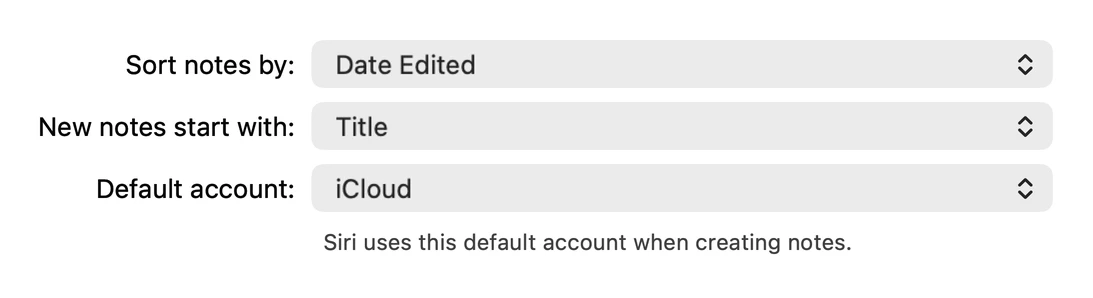
Siri AI can make a new note, too. Apple's Notes settings page for iOS 27 has a Default Account option for notes created with Siri and the Notes widget. If Siri's notes keep landing in On My iPhone or an old Gmail account, change it there. Move Apple Notes to iCloud explains the accounts.
And Siri AI can change a note's text if you select it first. The surest way to edit a note with Siri AI is the one Apple documents step by step. Select the text, tap the Siri AI icon, then describe the change or choose Proofread or Rewrite. After a rewrite you can compare the new version with the original before you keep it.
Siri AI on Apple TV and HomeView
The Apple TV 4K announcement is mostly about finding something to watch, and hands-free control of the home. The HomeView announcement describes a 7-inch display for a counter or a wall that recognizes up to six people. Both cost $299 in the US.
For anything personal, both need a paired iPhone with Siri AI. The HomeView page names Calendar, Messages and Apple Music as what Siri AI can reach there. Neither page names Notes, so I wouldn't buy either to read out a shopping list from Apple Notes until Apple says it can. HomeView isn't sold in the EU at all, because Siri AI isn't on iPhone there yet.
Siri AI with ChatGPT and other AIs
Siri AI can still pass a question to ChatGPT. Apple's steps: open Settings, then Siri, tap Set Up Extensions, tap ChatGPT and turn on Use Extension. Signing in to a ChatGPT account is optional, and only matters if you want the requests in your ChatGPT history.
With Siri AI, ChatGPT gets nothing until you ask for it by name, as in "ask ChatGPT to summarize this document", and you can't turn that check off. Apple's examples send a photo or a PDF in Files. None of its pages show ChatGPT reading your notes or writing an answer back into one. ChatGPT is the only extension these pages name. Apple built Siri AI with Google's Gemini models, but it doesn't offer Gemini as an extension you pick, and Claude isn't mentioned. Claude and Apple Notes covers the Mac options for Claude, and the Apple Notes API post covers what Shortcuts and AppleScript can do.
What Apple doesn't say yet
Apple's Write with Siri examples include "Tidy up the recipe I wrote down from my cooking class", but the page doesn't say whether the result replaces the note's text or appears in Siri's answer for you to copy. 9to5Mac reported in September that Siri AI can add to an existing note. Apple's pages don't spell that out, so check the note afterwards. Apple also doesn't say whether Siri AI reads locked notes, and I'd assume it doesn't.
I like the search part most. Finding a note by what's in it, rather than by the title you gave it in 2019, fixes a real problem. The writing part is a better Writing Tools. What Siri AI doesn't give you is an AI that keeps working on your notes for you, from ChatGPT on the web or from Claude Code in your terminal.
That's the gap I built Pinto Notes for. It's a notes app that works like Apple Notes, with a server built in that ChatGPT, Claude, Claude Code and Codex can use to search, read and edit your notes once you approve them. Every change an AI makes is tinted with an Undo, and the version before it stays in the history. On a Mac it imports your Apple Notes with their folders and leaves Apple Notes as it was. The Mac app is out now, and the iPhone app is coming soon to the App Store. Moving from Apple Notes has the steps, and what's new in Apple Notes in iOS 27 covers the rest of this year's update.
Notes ChatGPT and Claude can edit
Pinto Notes works like Apple Notes, imports your notes on the Mac, and lets the AIs you approve search and edit them.
Download Pinto Notes for MacThe iPhone app is coming to the App Store soon. Pinto Notes is on Mac today: send yourself the link to open there.
Send myself the linkPinto Notes is for iPhone and Mac. Send yourself the link to open on one.
Send myself the linkFree, for macOS 26 or later. Importing from Apple Notes only reads it; nothing there changes.
Questions
Can Siri AI find things in my Apple Notes?
Yes. In iOS 27, Apple says Siri AI can search for notes and search inside them. Its example is "What was the note with the cookie recipe?" Notes is also one of the apps Siri AI draws on for personal context, with Messages, Mail, Calendar and Reminders.
Can Siri AI summarize or rewrite a note?
Apple's Write with Siri page says it can proofread, rewrite and summarize text, with examples like "Condense these meeting notes to give me key points." Open the note first. To change the note's text directly, select it and choose Proofread or Rewrite, which lets you compare the new version with the original.
Which devices have Siri AI?
Siri AI is a beta in iOS 27, macOS 27, watchOS 27 and visionOS 27. On iPhone it needs an iPhone 15 Pro, iPhone 15 Pro Max or any iPhone 16 or later. On a Mac it needs Apple silicon (M1 or later) or the MacBook Neo. Apple TV 4K (2nd generation or later) gets it in tvOS 27.2, and HomeView has it from launch.
Can Siri AI on Apple TV or HomeView read my notes?
Apple doesn't say. Both need a paired iPhone with Siri AI for personal requests, and Apple's pages for them name Calendar, Messages and Apple Music, not Notes. Until Apple documents it, ask about a note on your iPhone or Mac.
Can ChatGPT save into Apple Notes through Siri?
Apple doesn't describe that. With the ChatGPT extension on, Siri AI sends a request to ChatGPT when you ask for ChatGPT by name, and the answer comes back in Siri. Apple's examples use a photo or a document in Files, and none of its pages show ChatGPT writing into a note.
Checked against the app on .