How to make flashcards with ChatGPT or Claude

Turning a chapter into flashcards used to take an evening. ChatGPT or Claude does it in a minute, which moves the hard part to two other places: whether the cards are any good, and whether the ones you get wrong come back.
The prompt
Left alone, an AI writes cards that are too long and too vague: “What are the key features of glycolysis?” with a paragraph for an answer. You can't say whether you knew that, so you can't grade yourself honestly. The fix is one fact per card, and answers short enough that you either knew them or didn't.
A flashcards prompt
Make flashcards from the notes below.

Rules:
- One fact per card. If a card needs "and" in the answer, split it.
- Questions I could be asked in an exam, not "What is mentioned about...".
- Answers of one line, in my notes' own terms.
- Only facts that are in my notes. If something important seems missing, list it at the end instead of making a card for it.
- Ten to fifteen cards, then stop.

Give them as a two-column table: Question, Answer.

My notes:
[paste them here]
"Only facts that are in my notes" keeps the AI from filling gaps with things your course never covered.
Read every card once before you study it. An AI can get a fact wrong while sounding sure of it, and a wrong card you learn well is worse than no card at all. Ten cards take a minute to check.
ChatGPT's own flashcards, and Claude's artifacts
ChatGPT has a built-in flashcard view. According to OpenAI's help article, you ask for cards on a topic or upload notes, flip each card, and mark it as known or to review again. You change cards by asking in the chat, and the cards are saved in your ChatGPT library. If you already study in ChatGPT, try that first.
Claude has no flashcard view, but it can build a small study app as an artifact in the chat. Ask for “a flashcard app with these cards: show the question, a button to show the answer, then Knew it and Didn't know”. Before you rely on it, check whether it remembers which cards you missed after you close the chat. The other option in both is a plain table you paste somewhere else, such as Anki.
Study them in an app your AI can fill
I make Pinto Notes, a notes app for Mac and iPhone that ChatGPT, Claude and Claude Code can read and edit once you allow them. A note in it can hold a small app. The Study notes and flashcards template is a note with a flashcard app already built, with sample biology cards to replace.
- Choose Study now on the template pageOn a Mac with Pinto Notes, it opens the app and adds a “Study notes and flashcards” note, with its app, to the folder you pick.
- Connect ChatGPT or Claude onceWith Read and Edit. Connecting ChatGPT needs Developer mode on a paid plan; Claude connects from its connector directory.
- Paste the template's prompt, then your notes“Here are my notes on cell respiration”, and the lecture notes after it. The AI makes five to ten cards under that topic, all starting in box 1.
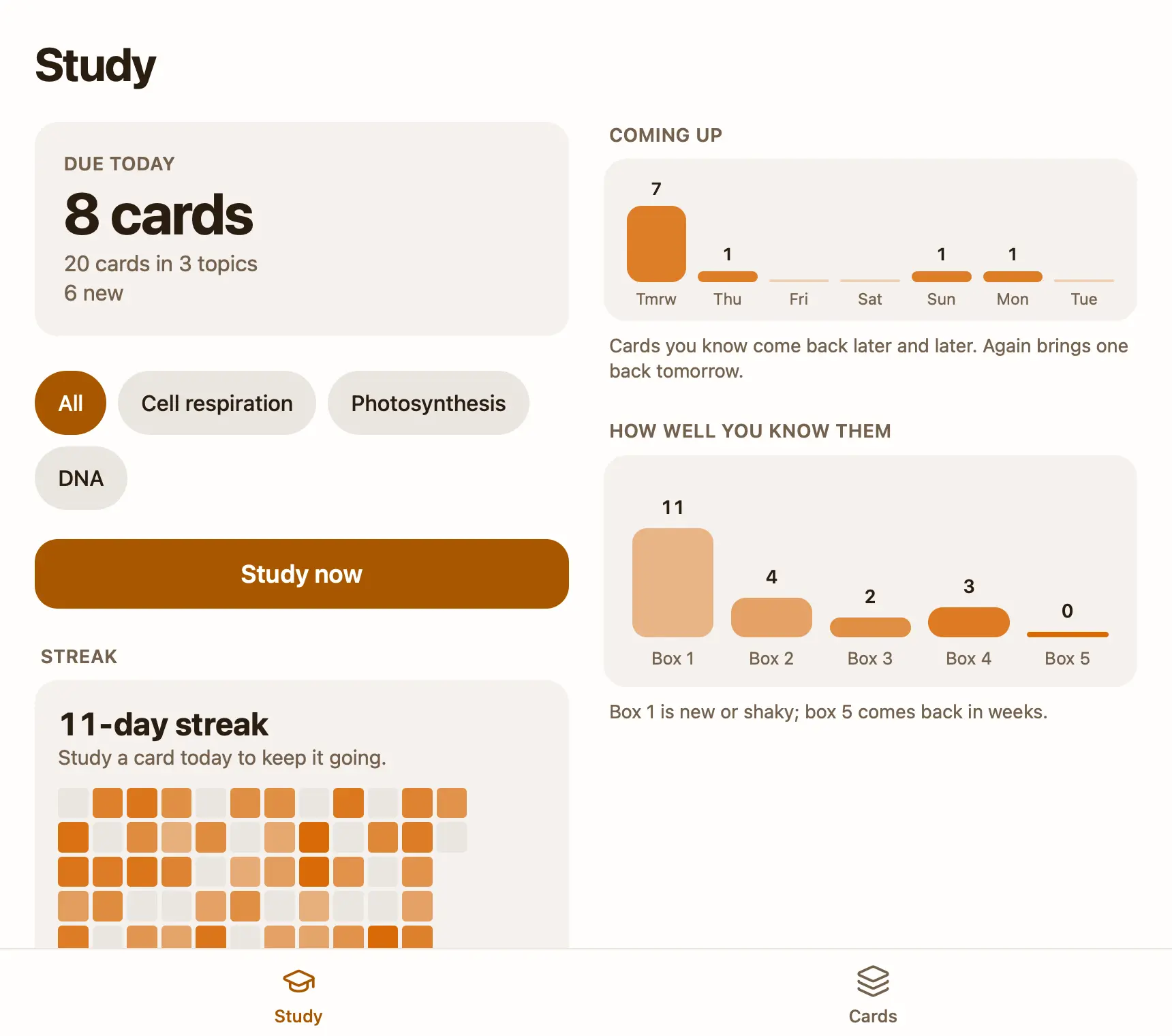
Then study in the app. The first screen says how many cards are due today and has one button, Study now. You see the question, tap Show answer, then Again, Hard, Good or Easy. Each button shows when the card comes back: a new card you know is back tomorrow, then in a few days, then weeks. Again brings a card back at the end of the session and again tomorrow. The cards you know least come first. On a Mac, Space shows the answer and 1 to 4 grade it, so a session goes fast.
You can also say “quiz me on biology, ten cards” in the chat. The AI asks one card at a time without showing the answer, tells you whether you were right, and moves each card the same way the app does. “Which cards do I keep missing?” gets an answer from the boxes. No Mac nearby? Copy the template's prompt instead, and your AI creates the note with its app from any device once Pinto Notes is connected.
What you can still do yourself
The Cards tab opens on an add form: type the question, the answer, press Return, and the next card is ready with the same topic. Paste many takes lines like “question - answer” and makes a card of each. Every card is listed by topic with when it's due; tap one to fix a wrong answer, or delete it, and Undo appears at the top of the screen. Topic pills on the Study tab narrow a session to one subject, which helps the week before one exam. The Study tab also keeps a streak, with a calendar of the last 12 weeks, and shows how many cards fall due each day this week.
Your AI can change the app itself too. It's a small React project in the note: ask for a “reverse the cards” button and check the result. Pinto Notes runs the app's tests on every save and only shows a version that passes. If you keep your lecture notes in another app, notes apps that work with ChatGPT compares the ones your AI can read.
What it doesn't do yet
You grade yourself: there are no typed answers and no multiple choice, and cards hold text only, no pictures. The scheduling is simpler than Anki's, with no settings, no daily limit on new cards and no import of Anki decks. There are no reminders, because apps in Pinto Notes can't send notifications yet.
The iPhone app isn't on the App Store yet, so the flashcard app opens on a Mac with macOS 26 or later. On your phone you can still say “quiz me” to ChatGPT or Claude, and it updates the same cards. If you already live in ChatGPT's flashcards or in Anki, that's fine; the prompt above works with both.
Try the flashcards on your Mac
Paste your notes, let your AI make the cards, and study what's due.
Download Pinto Notes for MacThe iPhone app is coming to the App Store soon. Pinto Notes is on Mac today: send yourself the link to open there.
Send myself the linkPinto Notes is for iPhone and Mac. Send yourself the link to open on one.
Send myself the linkFree, for macOS 26 or later. Importing from Apple Notes only reads it; nothing there changes.
Questions
Can ChatGPT make flashcards?
Yes. ChatGPT has its own flashcards: ask for cards on a topic or upload your notes, and it shows them in the chat to flip and mark as known or to review again. OpenAI says they're saved in your library, and suggests checking them against your notes.
Can Claude make flashcards?
Yes, as a table you can copy anywhere, or as an artifact you click through in the chat. Ask it to work only from the notes you paste, so the cards match what you'll be tested on.
Can I put ChatGPT flashcards into Anki?
Ask for the cards as two columns separated by a tab, one card per line, and save that as a text file. Anki's import reads that format. Check the first few cards after the import.
How does the Pinto Notes template decide when a card comes back?
Each card has an interval. Good multiplies it, Easy jumps further, Hard grows it a little, and Again starts it over at a day. It's the idea behind Anki's scheduling, with fewer settings. The buttons show the next interval before you tap, like "Good 8d".
Checked against the app on .