How to plan a trip with ChatGPT or Claude, and keep the itinerary

ChatGPT and Claude will write you a Lisbon itinerary in ten seconds. Two weeks later you're scrolling up through a long chat looking for the restaurant on day three, with the hotel confirmation in your email and the packing list on the back of an envelope.
The prompt
Most of a good itinerary comes from what you tell the AI you don't want. “Not museums” and “no car” remove more bad suggestions than any list of interests adds. Ask for three to five things a day. A plan with eight stops a day looks generous in the chat and is exhausting by day two.
A trip itinerary prompt
Plan a 4-day trip to Lisbon for two, 22 to 25 October. We like food, views and walking. Not museums. We're staying in Príncipe Real and don't want a car.

For each day give me a short title and three to five things, in the order we'd do them, with the rough travel time between places. Keep one evening free. Put anything that needs booking ahead in a separate list with why it needs booking.

Then a packing list for late October, for two, no checked bags.

Be specific about places, but say so if you're not sure something is open on that day.
The last line matters most. Without it, every place in the plan sounds equally certain.
ChatGPT and Claude both answer this well. If you use ChatGPT's or Claude's web search, they can also check opening hours, though I'd still open the place's own page for anything you're paying for. Follow up in the same chat: “swap day 2 and day 3, it's supposed to rain on the 23rd”, or “add a day trip to Sintra and drop one evening walk.”
What to check before you trust it
Go through the draft for three things before you book around it. Is each place open on the day the plan sends you there? Museums and restaurants often close on a Monday. Are the travel times realistic for you, on hills and with luggage? And does each restaurant still exist at that address? The AI's knowledge has a date, and a small place can close long before that date catches up. None of this makes the draft useless. The draft is where your planning starts, and the hour you spend checking it is the part the AI can't do for you.
Keep the plan where you can edit it
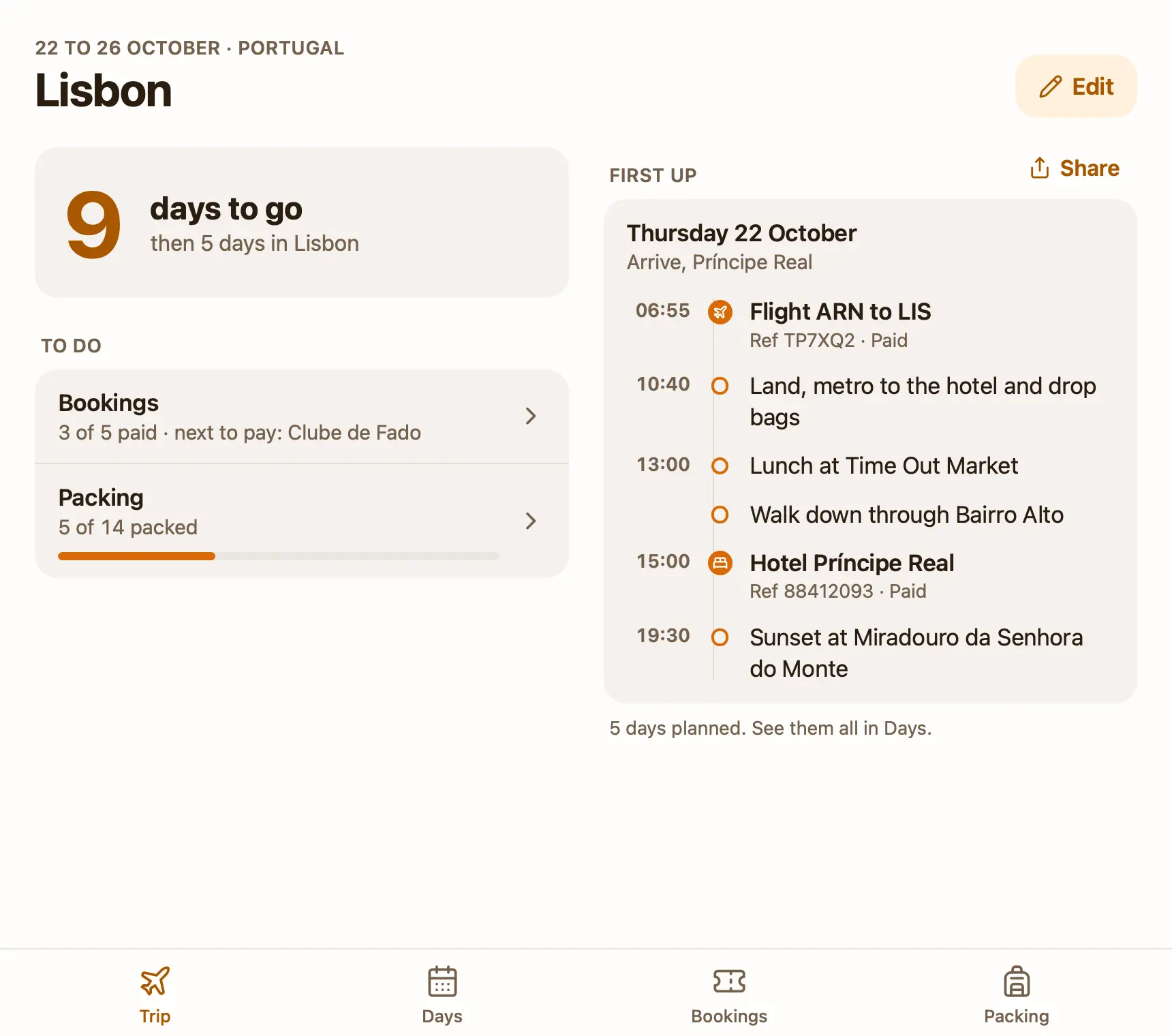
Once the plan is roughly right, it needs a home where you can change it without asking the AI, tick off what's paid and packed, and still let the AI add to it. I make Pinto Notes, a notes app for Mac and iPhone that ChatGPT, Claude and Claude Code can read and edit once you allow them. A note in it can hold a small app, and the Trip plan template is a note with a trip planner app already built, with a sample Lisbon trip to replace.
- Choose Plan the trip on the template pageOn a Mac with Pinto Notes, it opens the app and adds a “Trip plan” note, with its app, to the folder you pick.
- Connect ChatGPT or Claude onceWith Read and Edit. Connecting ChatGPT needs Developer mode on a paid plan.
- Paste the template's prompt, then your trip“Lisbon, 4 days in May. I like food, views and walking. Not museums.” The AI sets the trip and its dates, writes one day at a time with three to five things each, and adds what the trip needs to the packing list.
From then on, paste booking confirmations into the chat as they arrive: “Here's the hotel confirmation.” The AI adds a booking with what it is, when, and its reference, marked not paid. Ask “What do I still need to book?” and it reads the same list you see. If you already have a plan in a chat, paste it in and ask the AI to put it into the trip plan; that's quicker than retyping it.
No Mac nearby? The template page has the prompt to copy, which asks your AI to create the note with its app. It works from ChatGPT or Claude on any device once Pinto Notes is connected.
What you can still do yourself
The app has four tabs. Trip shows the countdown, bookings paid and items packed, and the next day as a timeline; during the trip the countdown becomes “Day 2 of 5” and the plan shows today. Edit on that tab changes the trip's name and dates.
Days shows each day as a timeline. A line that starts with a time, like “09:30 Tram 28”, goes in its place, and a booking with a day and time joins that day, so the 06:55 flight sits above lunch. Share sends one day, or the whole trip, as text: handy for the friend who asks “so what are we doing Thursday?”. Add a day, edit one, or delete it.
Bookings has each booking with its kind, day, time and reference; tap to tick it once it's paid. Packing is grouped (documents, clothes, toiletries, tech), you tap an item to pack it, and packed items drop to the bottom. You can add, edit or delete bookings and packing items too, and every delete shows Undo at the top of the screen. If you'd rather keep a plain checklist, Apple Notes templates has a packing list note to copy.
What it doesn't do yet
A day's plan is edited as text, one line per item, and you can't drag items around within a day. There's no map, no weather and no cost per booking, and the app can't look anything up online unless you allow a site. Booking still happens on the airline's or hotel's own site: the AI records a booking, it doesn't make one.
The iPhone app isn't on the App Store yet, so for now the trip plan opens on a Mac with macOS 26 or later. During the trip you can still ask ChatGPT or Claude on your phone “what's on today?”, since the AI reads the plan through the connection. When you're home, Start a new trip in the Edit sheet clears the plan and bookings and keeps the packing list, unpacked, so the next trip starts from what you took last time.
Try the trip planner on your Mac
The plan, the bookings and the packing list in one note your AI can fill in.
Download Pinto Notes for MacThe iPhone app is coming to the App Store soon. Pinto Notes is on Mac today: send yourself the link to open there.
Send myself the linkPinto Notes is for iPhone and Mac. Send yourself the link to open on one.
Send myself the linkFree, for macOS 26 or later. Importing from Apple Notes only reads it; nothing there changes.
Questions
Can ChatGPT plan a trip itinerary?
Yes, and it's good at a first draft: a day-by-day plan in your style, with travel times between places. Check opening days and prices on the places' own sites before you book anything, because the plan can be out of date or wrong.
Is Claude or ChatGPT better for trip planning?
Both write a good first itinerary. Use whichever you already pay for. The bigger difference is where the plan ends up: in a chat you scroll back to, or somewhere you can edit and tick off.
Is there a free trip planner template ChatGPT can fill in?
The Trip plan template for Pinto Notes is free and comes with its own app: a countdown, a day-by-day plan, bookings with paid ticks and a packing list. Once Pinto Notes is connected, ChatGPT or Claude fills it in, and you can change all of it yourself.
Can the trip planner show a map or the weather?
The Pinto Notes one can't. It has no map, no weather and no costs per booking, and the app has no network access unless you allow a site.
Checked against the app on .