How to make a habit tracker with ChatGPT or Claude (that you can still edit yourself)

Asking ChatGPT or Claude for a habit tracker takes one message. Getting one you still use in week three, and can change without asking the AI every time, takes a little more thought about where the ticks live.
Route 1: ask ChatGPT or Claude to build one
Both can write a small app from a description. In Claude it opens as an artifact beside the chat. In ChatGPT you get code in a canvas, or a spreadsheet to download if you ask for one. Be specific about your habits, and say which ones you count (glasses of water) and which are yes or no. Without that, you tend to get a generic tracker with sample habits you then have to argue away.
A habit tracker prompt
Build me a habit tracker as a small interactive app I can use right here.

My habits:
- Walk, 30 minutes outside (yes or no)
- Read, 20 pages (yes or no)
- Water, 8 glasses (count it, with minus and plus buttons)

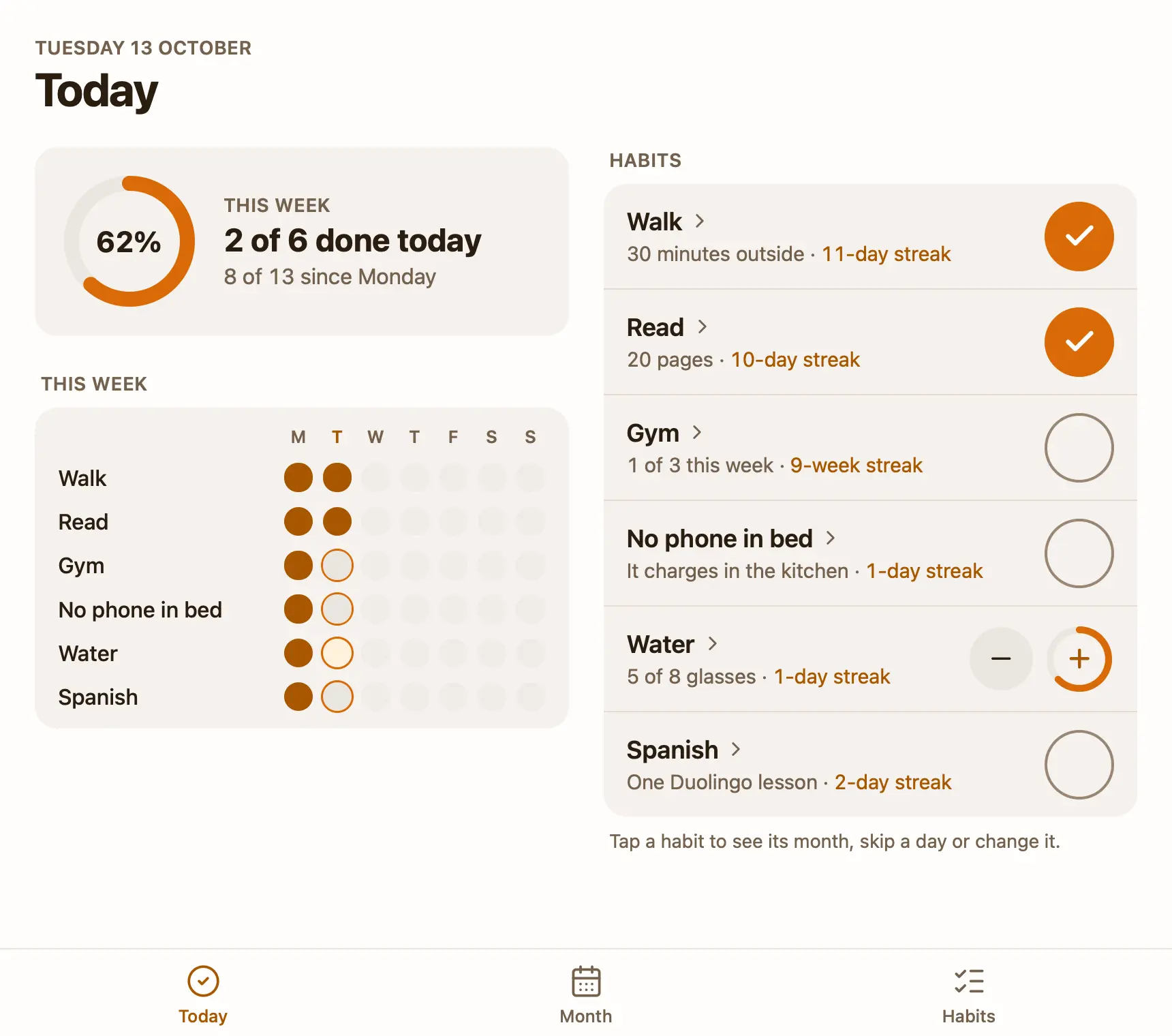
Show today first: each habit with a big tick (or the counter), and its streak. Under it, this week as seven small dots per habit. Let me add, rename and remove habits myself, and fix an earlier day by tapping it.

Keep it to one screen. No login, no charts I didn't ask for.
Swap in your own habits. Two or three is a good start: a tracker with nine habits on day one is usually abandoned by Friday.
Then test the one thing that decides whether it's a tracker or a demo. Tick a habit, close the chat, and open it again tomorrow. If the tick is gone, the app keeps nothing between visits and you're back to a blank week. A downloaded spreadsheet does keep your ticks, but then it's a file on your computer the AI can't see unless you upload it again.
This route is good for trying a layout. You can say “make the ticks bigger” or “add a 30-day view” and see it a few seconds later. It gets awkward when you want both things at once: a tracker you tick on your own, and an AI that knows what you ticked.
Route 2: start from the habit tracker template
I make Pinto Notes, a notes app for Mac and iPhone that ChatGPT, Claude and Claude Code can read and edit once you allow them. A note in it can hold a small app, and the Habit tracker template is a note with a habit tracker app already built, with sample habits to replace.
- Choose Start tracking on the template pageOn a Mac with Pinto Notes installed, it opens the app and adds a “Habit tracker” note, with its app, to the folder you pick. The Mac app is a free download.
- Connect your AI onceAdd Pinto Notes in ChatGPT or Claude and choose Read and Edit when Pinto Notes asks. Connecting ChatGPT takes a few minutes in Developer mode, on a paid plan.
- Paste the template's prompt into a chatIt tells the AI where the habits and days are kept and how to log a day. You paste it once per chat.
No Mac nearby? Copy the prompt on the template page instead. It asks your AI to create the note with its app for you, so it works from ChatGPT or Claude on any device once Pinto Notes is connected.
What you can still do yourself
The app has three tabs. Today shows this week's ring and each habit with its tick and streak. A counted habit, like Water with a goal of 8 glasses, gets minus and plus buttons, and its ring fills as you go. Habits that aren't for today, like a weekday habit on a Sunday, wait under Not today. Month shows a calendar per habit: tap a day to tick it, which is how you fix the Tuesday you forgot. Tap it again to mark it skipped.
Tap a habit's name for its own page: its streak, its best run, this month, and Skip today. A skipped day doesn't break the streak, so a sick day doesn't wipe out three weeks of walks.
On the Habits tab you add, rename, reorder and remove habits, and set how often each one is for: every day, some weekdays, or a number of times a week, like the gym three times. Removing one shows Undo at the top of the screen, and the habit's days stay in the data, so Undo brings its history back. None of this needs your AI. I'd set the habits up by hand on the first day, because it's quicker than describing them.
Let your AI log the day
The app keeps its data with the note, and your AI reads and edits that same data. So at the end of a day you can open ChatGPT or Claude, on your phone or anywhere else, and type what happened:
- “Log today: walked, read 30 pages, 6 glasses of water, phone in bed again.”
- “Which habit did I miss most this month?”
- “How's my week looking?”
For the first one, the AI sets each habit for today's date: done for Walk and Read, 6 for Water, nothing for the phone habit. Open the note and the ticks are there. For the third, it adds three short lines to the note under Weekly check-in: what went well, what slipped, and one thing to try next week. Every earlier version of the note is kept, so a wrong edit is easy to put back.
If the template isn't quite what you want, ask your AI to change it. The app is a small React project inside the note, and ChatGPT or Claude can edit it the same way it edits the data: “add a habit for stretching that only counts on weekdays”, then look at the result. Or start from nothing in a note of your own and say “Make my note an app: a habit tracker for these three habits”. Pinto Notes runs the app's tests on every save and only shows a version that passes.
What it doesn't do yet
Apps in Pinto Notes can't send notifications, so nothing reminds you to tick, and the AI only logs a day when you tell it to. There are no habit icons or colours, and no notes on a day yet; ask your AI if you want them.
The iPhone app isn't on the App Store yet, so today the tracker opens on a Mac (macOS 26 or later). ChatGPT and Claude can still log days from your phone, since they reach the note through the connection, not the app. To let ChatGPT edit it, you need a plan with custom apps (Plus, Pro, Business, Enterprise or Edu). If you want a few words about the day next to the ticks, see journaling with ChatGPT or Claude, and the weekly review post for a longer Sunday check-in.
Try the habit tracker on your Mac
A habit tracker app in a note: tick it yourself, or tell your AI what you did.
Download Pinto Notes for MacThe iPhone app is coming to the App Store soon. Pinto Notes is on Mac today: send yourself the link to open there.
Send myself the linkPinto Notes is for iPhone and Mac. Send yourself the link to open on one.
Send myself the linkFree, for macOS 26 or later. Importing from Apple Notes only reads it; nothing there changes.
Questions
Can ChatGPT make a habit tracker?
Yes. Ask for a small interactive app or a spreadsheet, and list your habits. What it can't do on its own is keep your ticks between chats unless the thing it built saves them somewhere, so check that before you rely on it.
Can Claude make a habit tracker?
Yes. Claude builds it as an artifact you can click in the chat. Test it the same way: tick a habit, come back the next day, and see whether the tick is still there.
Is there a free habit tracker ChatGPT can update?
The Habit tracker template for Pinto Notes is free and comes with its own app. Once Pinto Notes is connected to ChatGPT or Claude, the AI can log days in it, and you can tick everything yourself as well.
Will the habit tracker remind me?
Not the Pinto Notes one: apps in a note can't send notifications yet. Use your phone's reminders or calendar for the nudge.
Checked against the app on .