How to make a budget tracker with ChatGPT or Claude

A budget only works if logging an expense takes less effort than skipping it. Saying “412 on groceries” to your AI is about as little effort as it gets, as long as the number lands somewhere that adds up correctly.
Route 1: ask ChatGPT or Claude to build one
Start with the categories you already think in and a monthly amount for each. Five or six categories is plenty; with fifteen you spend the month deciding whether coffee is Eating out or Fun.
A budget tracker prompt
Build me a simple monthly budget tracker as a small interactive app.

Currency: kr. Categories and monthly budgets:
- Groceries 4,000
- Eating out 1,500
- Transport 800
- Home 1,000
- Fun 1,000

First screen: what's left this month as one big number, a bar, and each category against its budget. One Add expense button that asks for the amount first, then what it was and the category.

Let me edit or delete an expense, and change the categories and budgets myself. No charts beyond the bars, no income, no login.
Change the currency, categories and amounts to yours. The amount-first Add button is what makes logging quick.
Claude shows the result as an artifact you can click through. ChatGPT gives you code in a canvas, or a spreadsheet if you ask for one, with formulas you can check. Before you trust either, add three expenses, then close the chat and come back. If they're gone, the tracker keeps nothing between visits. A spreadsheet keeps everything, but it lives in your Downloads folder, and the AI only sees it when you upload it again.
Let the app do the sums
A language model is good at turning “85 on the bus card and a 412 grocery shop” into two tidy rows. It's less reliable at adding forty numbers in its head, and a budget is mostly adding. So whatever you build, I'd keep one rule: the AI writes rows, and code adds them up. In a spreadsheet that means formulas. In an app it means the totals are computed from the expenses every time the screen opens, so a wrong total can only come from a wrong expense, and you can find that one and fix it.
Route 2: start from the budget template
I make Pinto Notes, a notes app for Mac and iPhone that ChatGPT, Claude and Claude Code can read and edit once you allow them. A note in it can hold a small app. The Budget and expenses template is a note with a budget app already built, with sample categories and a month of sample expenses to replace.
- Choose Start budgeting on the template pageOn a Mac with Pinto Notes, it opens the app and adds a “Budget and expenses” note, with its app, to the folder you pick.
- Connect ChatGPT or ClaudeOnce, with Read and Edit. Connecting ChatGPT needs Developer mode on a paid plan; Claude connects from its connector directory.
- Paste the template's prompt into a chatIt tells the AI where the expenses are kept and that every expense needs a date, what it was, a category from your list, and an amount.
Then talk to it the way you'd text a partner: “Spent 412 on groceries and 85 on the bus card today.” The AI adds two expenses, and the Month screen shows the new total. “How am I doing against the budget this month?” gets you an answer from the same numbers the app shows. At the end of the month it compares each category with its budget and gives one suggestion. The prompt tells it not to give financial advice beyond that.
No Mac nearby? The template page also has the prompt to copy. It asks your AI to create the note with its app, so it works from ChatGPT or Claude on any device once Pinto Notes is connected.
What you can still do yourself
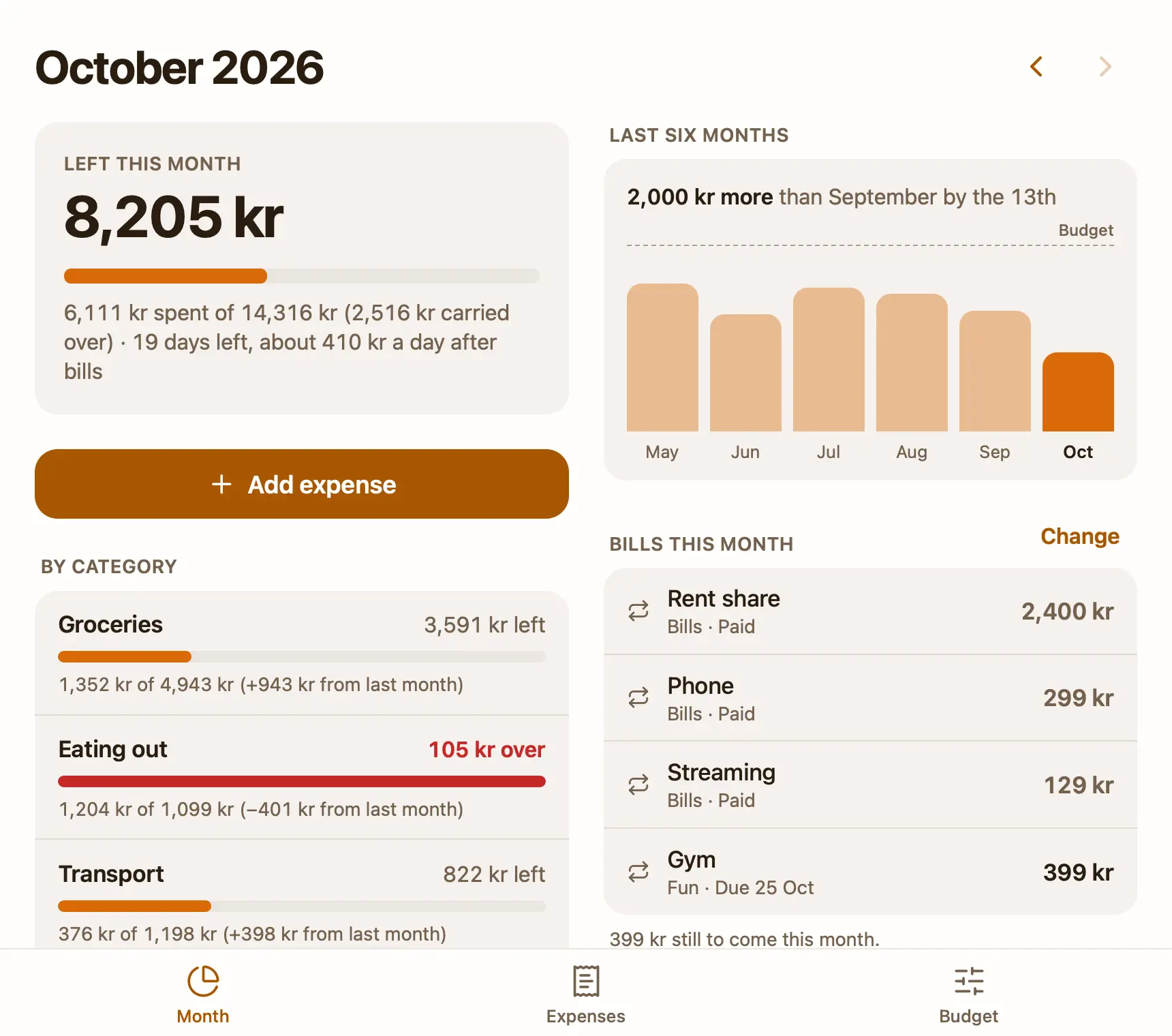
Month is the first screen: what's left as a number and a bar, about how much a day that leaves, and each category against its budget. Next to it, a bar for each of the last six months and a line like “600 kr less than September by the 13th”, which is the comparison that matters halfway through a month. Add expense starts on the amount. On Expenses, every expense of the month is listed by day; tap one to change it, or delete it, and Undo appears at the top of the screen. Earlier months are one tap back.
Rent and subscriptions go in once. Turn on Every month when you add one, or add it under Every month on the Budget tab, and the app adds its expense on that day each month. Until then it's listed as due, and the per-day figure counts it. Roll over what's left is a single switch: what you didn't spend in a category carries into next month, and what you overspent comes off it.
Budget is also where you add, rename and remove categories, change each monthly amount, and set the currency. A removed category keeps its expenses, so last month's total doesn't change under you. If the template's layout isn't right, ask your AI to change the app itself: it's a small React project in the note, and Pinto Notes runs its tests on every save and only shows a version that passes.
What it doesn't do yet
It connects to no bank and imports nothing. Every expense is one you or your AI added. If you want your card spending pulled in automatically, use your bank's app or a budgeting app for that. There's no income, no savings goal per category and no budget that changes from month to month, and there's no CSV export yet. Over budget is shown in red, but nothing alerts you.
The iPhone app isn't on the App Store yet, so the budget app opens on a Mac with macOS 26 or later. ChatGPT and Claude can still log expenses from your phone, because they reach the note through the connection, not the app. Notes, and the app's data with them, are end-to-end encrypted on your devices; see what an AI can read while it works. For bills to pay and other money errands, a ChatGPT to-do list works the same way.
Try the budget template on your Mac
A budget app in a note: add expenses yourself, or tell your AI what you spent.
Download Pinto Notes for MacThe iPhone app is coming to the App Store soon. Pinto Notes is on Mac today: send yourself the link to open there.
Send myself the linkPinto Notes is for iPhone and Mac. Send yourself the link to open on one.
Send myself the linkFree, for macOS 26 or later. Importing from Apple Notes only reads it; nothing there changes.
Questions
Can ChatGPT make a budget tracker?
Yes: a spreadsheet you download, or a small app in a canvas. Give it your categories and monthly amounts. Check its sums once by hand, and check that what you enter is still there after you close the chat.
Can Claude build a budget app?
Yes. Claude builds it as an artifact you can use in the chat. Whether your expenses are saved between visits depends on what it built, so add one, come back the next day, and look.
Should I give ChatGPT my bank statements?
That's your call, and it depends on your plan's data settings. You don't need to for a budget: telling it "412 on groceries" is enough to log an expense, and nothing about your bank is involved.
Is there a free budget template ChatGPT can fill in?
The Budget and expenses template for Pinto Notes is free and comes with its own app. Once Pinto Notes is connected, ChatGPT or Claude adds expenses to it, and the app does the sums.
Checked against the app on .