
Apple Notes meal planner template, with the grocery list

Deciding what's for dinner at six, then finding out there's no rice. A meal plan fixes both, and Apple Notes can hold one next to the grocery list it needs. Here's a template to paste in, how to set it up so the list works in the shop, and where it stops.

The template: one note per week
A week of dinners for two, as an example. Change the dinners first, then the groceries they need. Keep every line with a word in it, because an empty checklist item doesn't survive the paste. The last heading is a plain list of what you always have, so you don't buy olive oil every week.
Meal planner for Apple Notes
# Dinners, week of 23 November

## Dinners
- Monday: lemon chicken with rice
- Tuesday: pasta with tomato and basil (Oskar cooks)
- Wednesday: fish tacos
- Thursday: chickpea curry (Oskar cooks)
- Friday: homemade pizza
- Saturday: out with friends
- Sunday: roast chicken and potatoes

## Fruit and veg
- [ ] Lemons
- [ ] Basil
- [ ] Cherry tomatoes
- [ ] Limes
- [ ] Potatoes

## Meat and fish
- [ ] Chicken thighs
- [ ] White fish
- [ ] Whole chicken

## Everything else
- [ ] Tortillas
- [ ] Chickpeas
- [ ] Coconut milk
- [ ] Pizza dough
- [ ] Mozzarella

## Always in the cupboard
- Olive oil, salt, pepper
- Rice, pasta, oats
- Onions, garlic
On a Mac, paste it into a new note with Edit, Paste as Markdown.
Set it up

- Mac
On a Mac with macOS 27, make a new note and choose Edit, Paste as Markdown. The # line becomes the title, each ## line a heading, the dinners stay a list and the groceries become checklists. A plain Command-V keeps the symbols as text. On iPhone, type the lines, select the groceries and tap the checklist button.
Then turn on Automatically sort checked items in the Notes settings. In the shop, each thing you tick drops to the bottom of its list, so what's left stays on top.
Make it work better
- Mac
- Mac
- Next week from this one. On Sunday, choose File, Duplicate Note, change the dinners, and click in each aisle and choose Format, More, Uncheck All. Most weeks share half their groceries.
- Recipes one tap away. Keep each recipe in its own note and link it from its dinner with Add Link. On iOS 27 and macOS 27 a link can point at a heading too, so “Ingredients” opens right where you need it. What's new in Apple Notes in iOS 27 has the details.
- Shared with whoever cooks. Share the note and let people make changes. Whoever is in the shop ticks things off, and the other phone sees it. You both need an Apple Account, and a locked note can't be shared this way.
If you'd rather see the week as a grid with a column for who cooks, Format, Table makes one; tables in Apple Notes shows how. For more notes to paste in the same way, see Apple Notes templates.
Where a meal planner in Notes stops
- The list is by hand. Notes doesn't know a curry needs coconut milk. You read each recipe and type what it needs, every week.
- No sorting by aisle. You decide where lemons go. Reminders has a Groceries list that sorts items by section as you add them, but then the list lives apart from the dinners. The grocery list template has the aisles ready.
- No memory of what you have. Notes can't tell you there's rice at home. The cupboard list helps only if you read it before you write the groceries.
- No ideas. When nobody knows what to cook, the note waits.
Sharing is the part Notes does well. Planning the dinners and turning them into a list is the part you still do yourself.
A meal plan that writes the grocery list
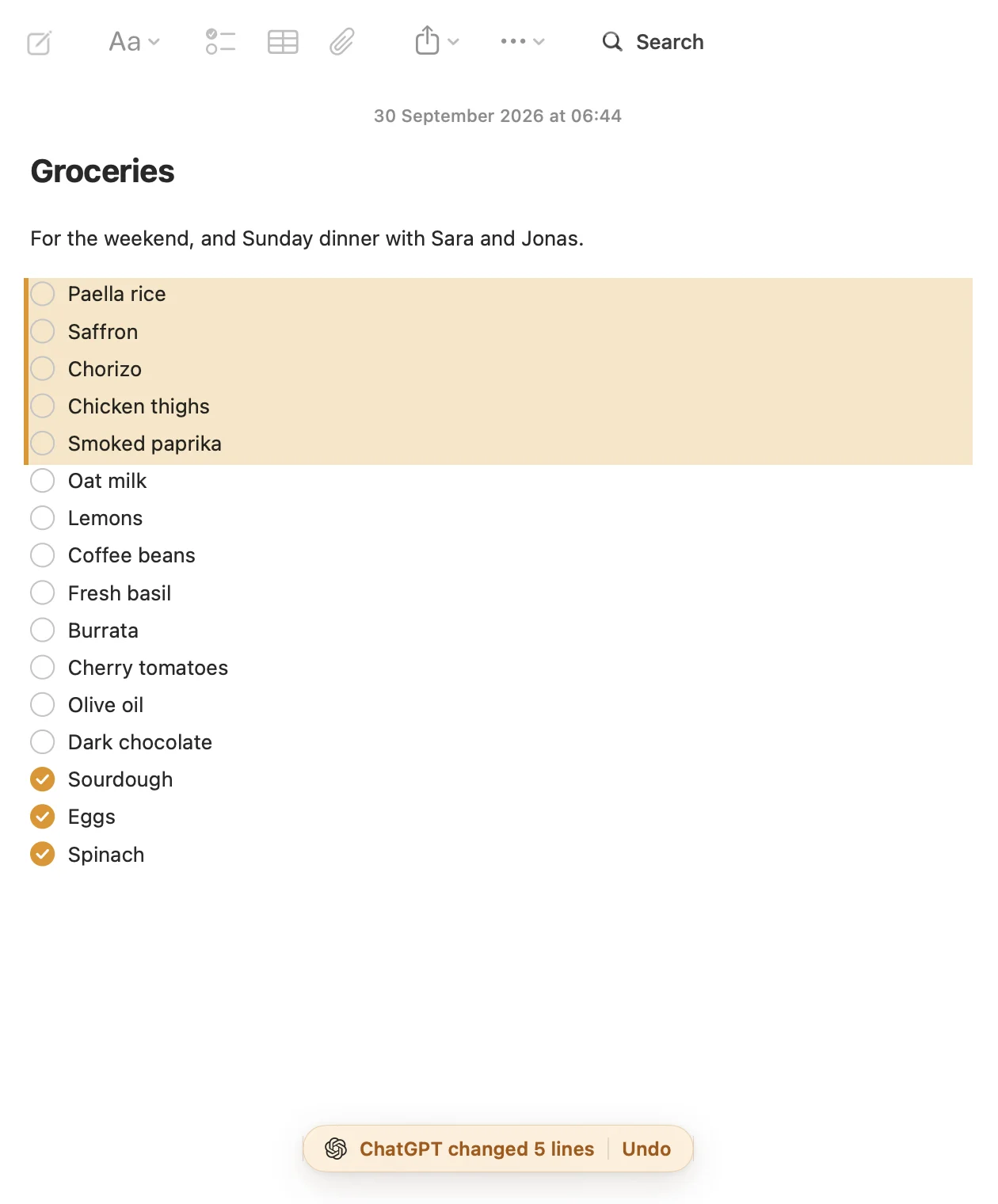
That's why I made Pinto Notes. It looks and works like Apple Notes on iPhone and Mac, and ChatGPT or Claude can work in your notes from the chat you already use. The free meal plan template is a note with the week's dinners and who cooks, the groceries by aisle, and what's always in the cupboard.
On the weekend, ask your AI to plan the week. It asks which nights you're cooking and what to skip, suggests dinners, fills in the week, then writes the grocery list by aisle and leaves out what's already in the cupboard. Say “add oat milk” on Wednesday and it lands under the right aisle. Every line it adds is tinted, with Undo, and every earlier version of the note is kept. Connecting ChatGPT takes a minute.
Your Apple Notes come over in one import on your Mac, and Apple Notes isn't changed.
Questions
Does Apple Notes have a meal planner template?
No. Apple Notes has no meal planner and no templates. One note with the week's dinners at the top and the grocery list as checklists below works as one, and you can paste the template on this page straight in.
Can I share a meal plan in Apple Notes with my partner?
Yes. Share the note and choose that people can make changes. You both need an Apple Account, and a locked note can't be shared to edit. Ticks show up on both phones.
Should the grocery list go in Notes or Reminders?
Reminders has a Groceries list type, from iOS 17, that sorts items by section as you add them. Notes keeps the list next to the dinners it came from. If you plan the week first, keeping both in one note saves copying.
Is there a meal planner that writes the grocery list for you?
Pinto Notes has a free meal plan template: the week's dinners, who cooks, and the groceries by aisle. ChatGPT or Claude can plan the week in it and write the list, leaving out what's always in the cupboard.
Checked against the app on .


