Does Apple Notes have version history? No. What to do

You changed a note, or someone did, and the part you needed is gone. The obvious next step is an earlier version. Here's the short answer for Apple Notes, what can still bring the text back, and how to never be here again.

Does Apple Notes have version history?
No. Apple Notes keeps the current text of each note and nothing before it. Pages and Numbers have Browse All Versions; Notes doesn't, and its notes live in one database rather than in files, so a Mac's Time Machine can't show you an earlier version of a single note either. iCloud keeps every device the same, which means a change, or a mistake, reaches all of them within seconds.
That still leaves a few ways to get text back, depending on how long ago it happened. Try them in this order.
Right after the change: Undo
If you're still in the note, Undo is the only real version history Apple Notes has. On a Mac, choose Edit, Undo, or press Command-Z, as many times as you need. On iPhone, swipe left with three fingers, or shake the phone and tap Undo. It works for what you just did in that note; once you've moved on, it usually can't reach back.
If the whole note is gone rather than changed, that's a different case: it's probably in Recently Deleted for 30 days, and how to recover deleted Apple Notes walks through it.
In a shared note: see who changed what
If the note is shared, Notes keeps a record of who edited it. Tap or click the shared note button at the top of the note, then choose Show All Activity for a list of edits by person and date, or Show Highlights to mark each change in the margin with its author.
It tells you who and when, which is often enough to ask the person what was there. It won't restore anything: deleted text isn't marked, and there's no way to roll the note back to an earlier edit.
On a device that hasn't synced yet
A Mac that's been asleep, or an old iPhone in a drawer, may still have the old note, until it connects and syncs. Before you open Notes on it, turn on Airplane Mode (or turn off Wi-Fi on the Mac). Then open the note, select the text you need and copy it into a new note in On My iPhone or On My Mac, or into another app. Only then go back online. The note itself will update to the new version, but your copy stays.
This only works if that device really hasn't synced since the change. If it has, it shows the same text as everywhere else.
From a backup
- Notes in iCloud: not in an iPhone backup. Apple says iCloud Backup doesn't include notes already stored in iCloud, so restoring a phone won't bring back an old version of them.
- Notes in On My iPhone: they are in the iPhone's backup, but restoring a backup replaces everything on the phone with how it was then. That's rarely worth it for one note.
- An export you made earlier: if you ever exported your notes as files, the old text is in that file. This is the one backup that works for a single note. How to back up Apple Notes shows how to make one.
Next time: keep a copy before big changes

With no history to fall back on, the habit that helps is a copy. Before you rewrite a note, or let anyone else edit it, choose File, Duplicate Note on a Mac (Command-D). On iPhone, select all the text and paste it into a new note. A regular export to files, once a week, covers everything else.
A notes app that keeps every version
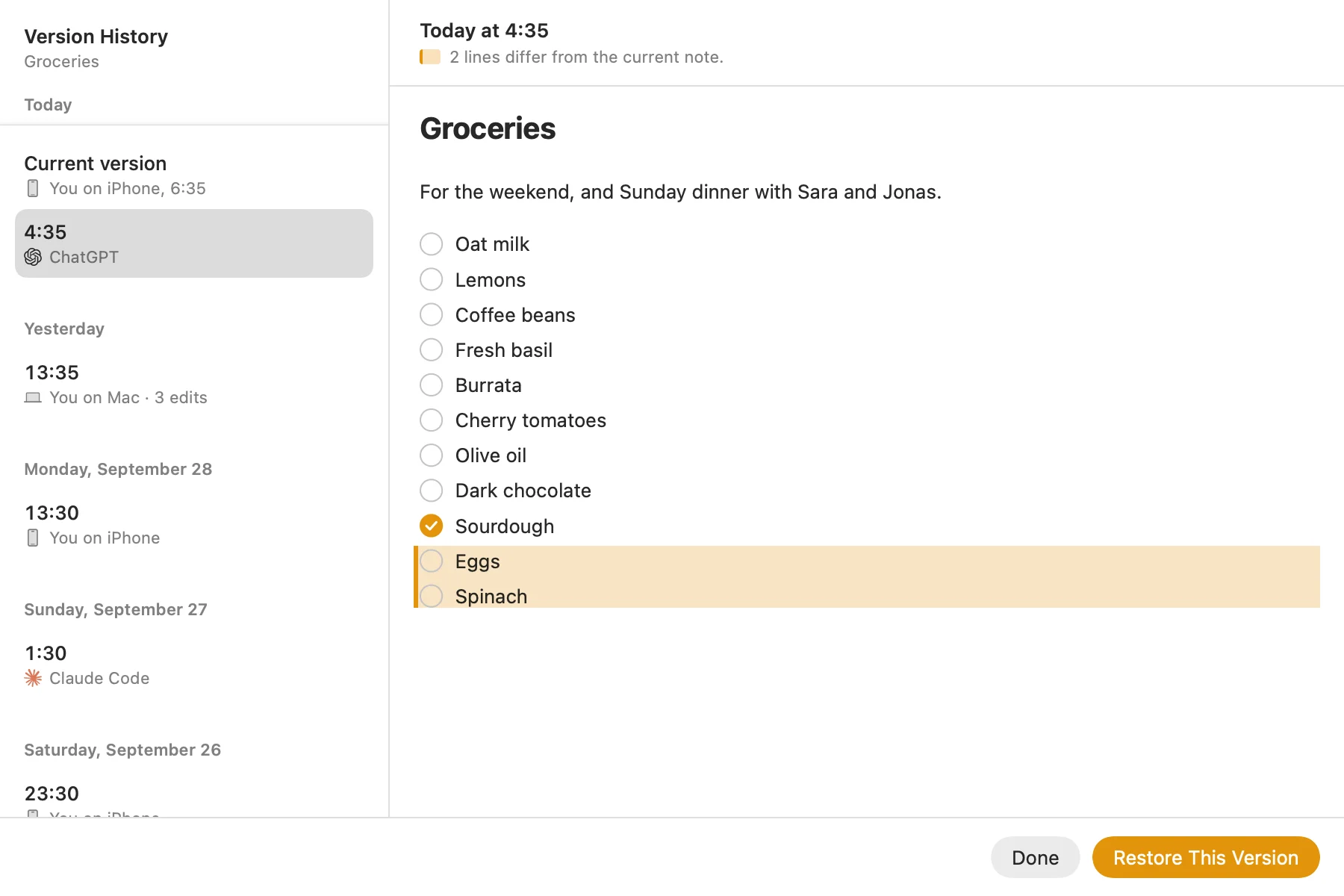
That's why I made Pinto Notes. It looks and works like Apple Notes on iPhone and Mac, and it keeps earlier versions of every note: every version from the last 24 hours, then the last one of each hour for a week, and the last one of each day for 90 days. Each version says who made it, you on your iPhone or Mac, or ChatGPT or Claude if you let them edit your notes, and the lines that differ are tinted.

Choose File, Version History on a Mac, or Version History in the note's More menu on either device, pick a version and choose Restore This Version. Restoring is itself saved as a new version, so the text it replaces isn't lost either.
Your Apple Notes come over in one import on your Mac, and Apple Notes isn't changed, so you can try it without giving anything up.
Questions
Does Apple Notes have version history?
No. Apple Notes keeps only the current text of a note, on iPhone, Mac and iCloud.com. Shared notes show who changed what, but you can't go back to an earlier version of any note.
Can I undo changes in Apple Notes after closing the note?
Usually not. Undo works for changes you just made in the note you're editing. Once you've moved on, Apple Notes has no earlier version to go back to.
Can Time Machine restore an old version of one note?
Not on its own. Apple Notes keeps every note in one database rather than one file per note, so Time Machine can't show you earlier versions of a single note the way it can for a document.
Does iCloud keep old versions of my notes?
No. iCloud keeps your notes the same on every device, so a change reaches all of them. Apple says iCloud Backup doesn't include notes that are already stored in iCloud.
Which notes apps keep version history?
Pinto Notes keeps earlier versions of every note, with who made each one, and puts any of them back with Restore This Version. Pages, Google Docs and Notion keep versions of their documents too.
Checked against the app on .