
Best notes app with MCP: 6 apps compared

Pinto Notes and Notion have hosted MCP servers. Bear has an official local server for Mac. Obsidian has community plugins, while Notesnook has a community experiment and Apple's Notes guide documents no MCP setup.
Six notes apps and their MCP connections
MCP stands for Model Context Protocol. It lets a compatible AI app call tools to work with your notes. This table compares the apps and the connections their documentation describes, checked on 21 November 2026. We publish Pinto Notes. We haven't tested the other apps' MCP connections or the community servers mentioned here.
| Notes app | MCP route | What the docs describe | Who it suits | What to know |
|---|---|---|---|---|
| Pinto Notes | Official hosted MCP server | Search, read, create and edit notes. You approve each AI app. | Apple Notes' feel on iPhone and Mac, with AI access from elsewhere. | Apple-only notes app. The hosted server works without leaving your Mac on. |
| Obsidian | Community MCP plugin | Local REST API with MCP adds search, reading and writing, including edits to one section. | A library of local Markdown files you can edit with other tools. | This plugin runs inside Obsidian on your computer. It is made by Adam Coddington, not Obsidian. |
| Bear | Official local MCP server | Bear's bundled bearcli lets an AI search, read, create and edit notes. | Keeping your Bear library and connecting it to a local AI client. | Mac only, Bear 2.8 or later. Encrypted notes cannot be read or changed through these tools. |
| Notesnook | Community experiment; no official MCP setup found | A community author announced a local bridge in Notesnook's Show and tell discussions. | Open-source notes with notebooks, tags and a web clipper. | The bridge is experimental and unofficial. Notesnook's help reviewed here does not document a supported MCP connection. |
| Notion | Official hosted MCP server | Search the workspace, create and edit pages, and manage databases. | Notes that belong with a team's documents and project databases. | The connection uses your Notion permissions. Review what your account can access. |
| Apple Notes | No official MCP setup documented in the Notes guide | Apple's guide covers using Notes itself, without an MCP connection. | Notes with iCloud, checklists, tables and media on Apple devices. | No Apple-made MCP route found in the documentation checked. See the Apple Notes section below. |
Pinto Notes and Notion have hosted connections
A hosted MCP server gives a compatible AI app an internet address to connect to. You authorize the connection, then ask the AI to use the tools it exposes. Pinto Notes' address is https://mcp.pintonotes.com. You approve each AI app, and its changes come with Undo and earlier versions.
Notion's official hosted server is at https://mcp.notion.com/mcp. Its documented tools search the workspace, edit pages and manage databases. That makes it worth considering when meeting notes belong beside a team's project work. The connection respects your existing Notion permissions.
Bear and Obsidian connect on your computer
Bear has its own server. Its official MCP guide documents bearcli mcp-server, bundled with Bear for Mac. The Claude Connector installs through Help, Advanced, Install Claude Connector. Both use the local Bear database. Bear also documents tag filters to limit visible notes. Encrypted notes stay out of reach.
Obsidian's strength is its folder of plain Markdown files. Its community directory lists Local REST API with MCP by Adam Coddington. The plugin adds a local server with an API key and can edit a particular heading or block. It runs inside Obsidian, so keep the app and computer running for that route.
Bear's connection is made by Bear. The Obsidian plugin is community-made. Neither connection described above is a hosted service. The Obsidian MCP comparison covers other approaches, including servers that work on the vault's files.
Notesnook has a community experiment
Notesnook is open source and has notebooks, tags and a web clipper. Its help pages reviewed for this comparison did not document an official MCP setup.
A community author posted an experimental local MCP bridge in the maker's repository. The author explicitly calls it unofficial. A post in Show and tell is a community announcement, and does not make the bridge a supported Notesnook feature. We haven't tested it. If you already use Notesnook, read the project's current requirements before deciding whether to try it.
What about Apple Notes MCP?
Apple Notes remains useful if you want iCloud notes with checklists, tables and media. Apple's Notes guide explains those tools, but does not document an MCP server. We found no Apple-made MCP setup in the documentation checked for this article.
Keep that distinction in mind when a search result says “Apple Notes MCP”. This table gives no assurance about a community project's capabilities. Other routes into an existing Apple Notes library run through a Mac.
Pinto Notes keeps the Apple Notes feel
Pinto Notes is for iPhone and Mac. There is no Windows, Android or web app. Its hosted server lets ChatGPT and Claude use your notes without leaving your Mac on. Claude Code and Codex can connect too. The Pinto Notes MCP server guide lists the tools and explains approval.
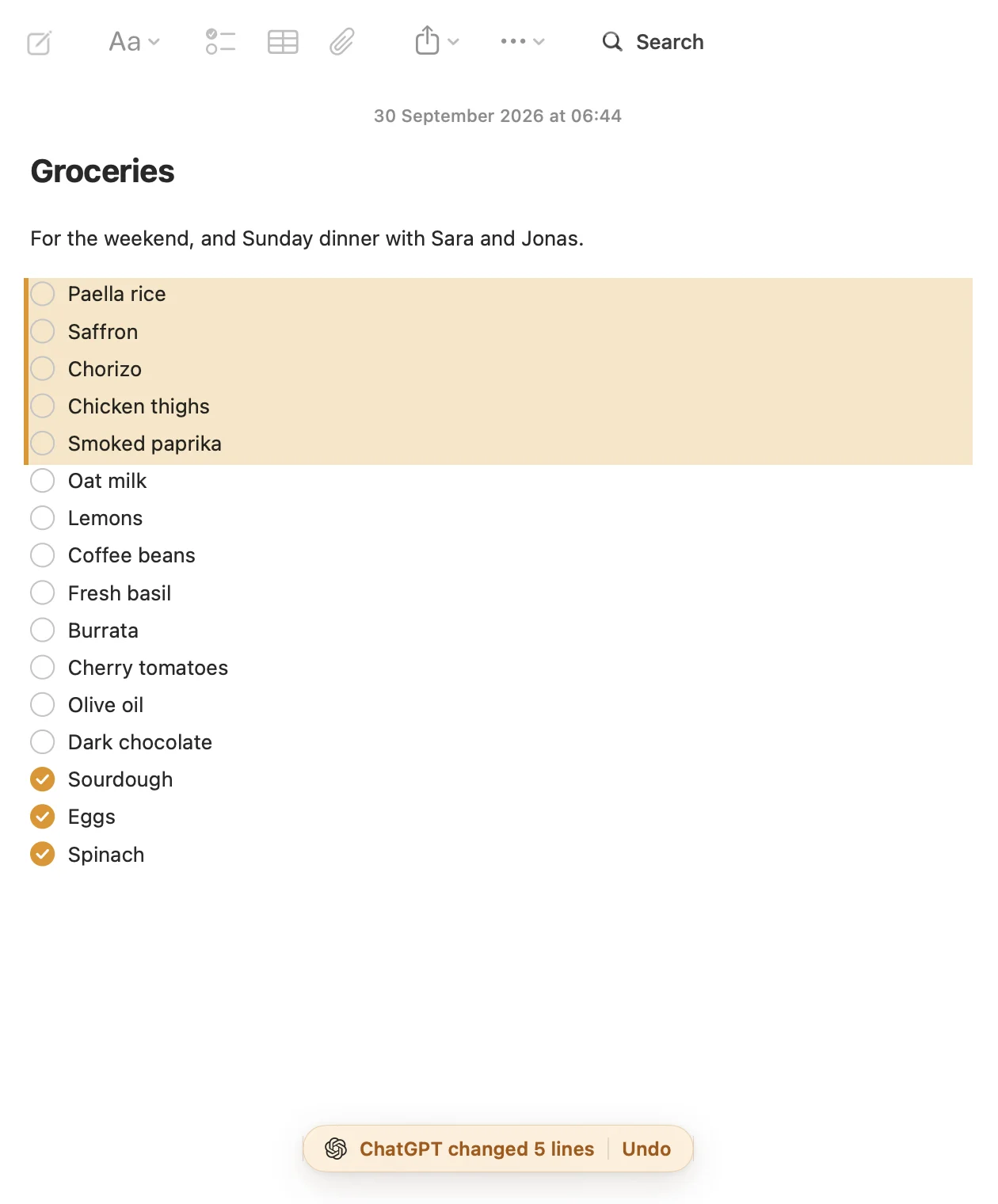
An AI can search and read notes, create one, or edit an existing note. You see what it changed, can undo it, and can return to an earlier version. To bring an existing library over, import Apple Notes on your Mac. Apple Notes stays unchanged.
Questions
Which notes apps document their own MCP server?
Pinto Notes and Notion have hosted MCP servers. Bear documents an official server that runs locally on a Mac. The Obsidian plugin and Notesnook experiment described here are community projects. We have not tested the other apps' connections.
Does Bear's MCP connection run on an iPhone?
No. Bear says its CLI, Claude Connector and MCP server are macOS-only and require Bear 2.8 or later. Its Claude Connector requires the Claude desktop app.
Is Notesnook MCP an official Notesnook feature?
No official MCP setup was found in the Notesnook help reviewed on 21 November 2026. A community author posted an experimental local bridge in the project's Show and tell discussions. It is unofficial, and we have not tested it.
Does Standard Notes document an MCP connection?
The Standard Notes help index checked on 21 November 2026 did not document an MCP setup. That does not establish whether a community project exists. We have not tested a Standard Notes MCP connection.
Checked against the app on .


