
OneNote alternative for Mac: starting with typed notes
Pinto Notes is a OneNote alternative for Mac if you want typed personal notes with Apple Notes' feel and connected AI access. It has no direct OneNote import, so start with new notes or copy a small set of pages you still use.
Choose the notes you want to keep using
A useful first move is a current project or a few personal reference pages. Leave the archive in OneNote while you try the new app. A typed meeting record is a different job from a page of drawings arranged around a diagram. Moving the words does not preserve that page's layout.
OneNote's notebooks, sections and pages give a large library a clear hierarchy. Its Mac app lets you draw anywhere on a page with a mouse or trackpad, and shared notebooks let other people work with you. These are reasons to keep it for the notebooks that use them. Microsoft documents the notebook structure, drawing tools and notebook sharing.
Device access matters too. OneNote has Windows and Android apps and a browser version, as listed in Microsoft's version guide. Pinto is for iPhone and Mac. There is no Windows, Android or web app. If you are deciding whether Apple's own app is enough, read Apple Notes vs OneNote for that comparison.
Save the originals before moving text
On a Mac, open a OneNote page and choose File, Save as PDF. Pick a filename and save it. Microsoft's Mac PDF guide describes a snapshot of that page. Later edits in OneNote do not update the PDF. Open the saved file and check it before relying on it as a reference copy.
For a whole notebook, Microsoft documents a separate export through OneNote for the web. Right-click the notebook, choose Export notebook, then confirm Export. Its notebook export guide limits this to personal OneDrive accounts. It does not work for work or school OneDrive or SharePoint notebooks. Keep the download as a backup, not as a file to import into Pinto.
What Pinto can and cannot import from OneNote
There is no direct OneNote import. Pinto cannot turn .one or .onepkg files into notes. It also does not convert OneNote PDF exports into editable notes through its Markdown and text importer. Putting a notebook export in a ZIP does not change its format.
For a few pages, copy the typed text into separate new notes. Start with a short page and compare it with the original. Check the order of text blocks, then check tables and links. Bring across pictures and attached files separately if you need them. Do not assume a text copy includes them.
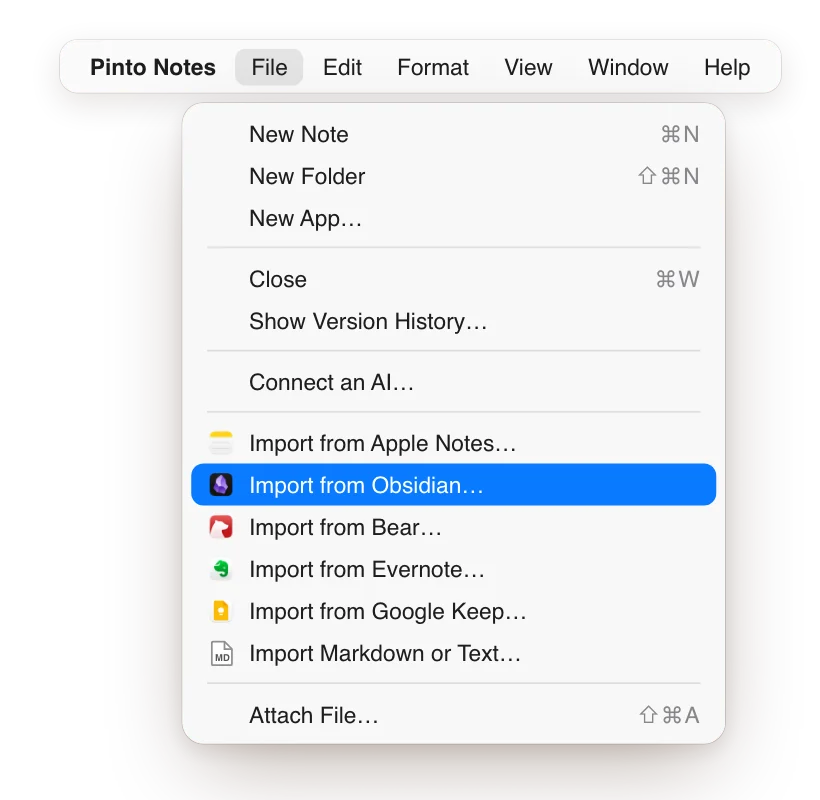
For more pages, you can prepare a folder of Markdown or text files yourself, one file per note. This is manual preparation, not a OneNote export option described in Microsoft's guides above. On your Mac, choose File, Import Markdown or Text in Pinto, then choose the folder. As Import your notes puts it, Pinto accepts “a folder or .zip of Markdown or text files. Each folder becomes a folder.”
Check a small set before moving more
OneNote switching check
Keep access to the original notebook.
Choose five typed pages used this week.
Copy each into a separate note or text file.
Check the reading order and any tables.
Compare links, pictures and attached files with the originals.
Keep drawings and page layouts in the original or a PDF.
Try the new notes on Mac and iPhone before moving more.
This is a checklist for a manual move, not an automatic notebook conversion.
Keep pages that depend on handwriting, scans or a free-form canvas in the original notebook or a checked PDF copy. This route moves typed text. It does not reproduce those parts as editable Pinto content.
Use your typed notes with ChatGPT or Claude
Pinto Notes looks and works like Apple Notes on iPhone and Mac. Once you connect ChatGPT or Claude, your AI can read and edit your notes. Approving the connection gives it both abilities. Every earlier version of a note is kept.
Try a specific request on the pages you copied: “Read my kitchen project notes and add a checklist of decisions still to make.” Review the result against your notes. Your AI can work with the text you brought into Pinto; connecting it does not import the rest of your OneNote library.
Write your next few personal notes in Pinto and see whether they cover your daily work. You can leave shared notebooks in OneNote and move more typed pages later, after checking the first set.
Questions
Can Pinto Notes open a OneNote .one or .onepkg file?
No. Pinto Notes has no direct OneNote importer. It can import a folder or .zip of Markdown or text files, but a OneNote notebook download is not that format. Copy the typed pages you need, or prepare Markdown or text files yourself.
What can I save from OneNote on a Mac before switching?
Microsoft documents File, Save as PDF for the current page on a Mac. For a whole notebook, its web export works with personal OneDrive accounts only, not work or school OneDrive or SharePoint. Neither route creates editable Pinto notes.
Will a OneNote PDF become an editable note in Pinto?
No. Pinto's Markdown and text importer does not turn PDF pages into editable notes. Keep PDFs as reference copies. To continue editing the words in Pinto, copy the text into a note or put it in a Markdown or text file first.
Checked against the app on .


