Apple Notes budget template that adds itself up

You want a budget where you already write everything down, not another app with a login. Apple Notes can do more of it than you'd think. Here's a template you can paste in that adds itself up, where it stops, and what to use when you outgrow it.

The template: a monthly budget that adds itself up
Make a new note and paste this in. Change the amounts and the names to yours; any name works as long as it's spelled the same way each time.
Monthly budget for Apple Notes
Budget, November

Income = 3200

Rent = 1200
Food = 450
Transport = 120
Phone = 30
Fun = 150
Saving = 500

Rent + Food + Transport + Phone + Fun + Saving =
Income - Rent - Food - Transport - Phone - Fun - Saving =
Notes offers each answer after the equals sign. Press Return to keep it.
The first sum is what you've planned to spend. The second is what's left once everything, saving included, is taken out of your income. If the second answer is below zero, the plan doesn't fit.
Keep one note per month. On a Mac, File, Duplicate Note copies last month's, so you only change the title and the amounts that moved. If you keep other templates too, Apple Notes templates shows how to set up a Templates folder.
How it adds up

- Mac
Notes calls this Math Results. A line like Rent = 1200 gives the number a name, and any later line ending in an equals sign gets its answer. Change Food from 450 to 500 and both totals follow, which is most of what a budget spreadsheet does for you. If no answer appears on a Mac, check that Format, Math Results is turned on.
One catch: it doesn't work inside a table. Math Results switches off while you're in one, so a Total cell stays as text. Tables in Apple Notes goes through what tables can and can't do.
Where an Apple Notes budget stops
- Spending is by hand. To track what you actually spent, you add a line for each purchase and a name to the sum. After a few weeks the sum line gets long.
- No months side by side. Each month is its own note, so seeing how this month compares with the last six means opening six notes.
- No bills that repeat. Rent and subscriptions have to be typed into every month's note.
- No categories against a limit. You can see what's left in total, not that eating out is over and transport is under.
For a plan you set once a month, the note is enough. If you want to log spending as it happens, that's where a note runs out.
A budget note that keeps itself
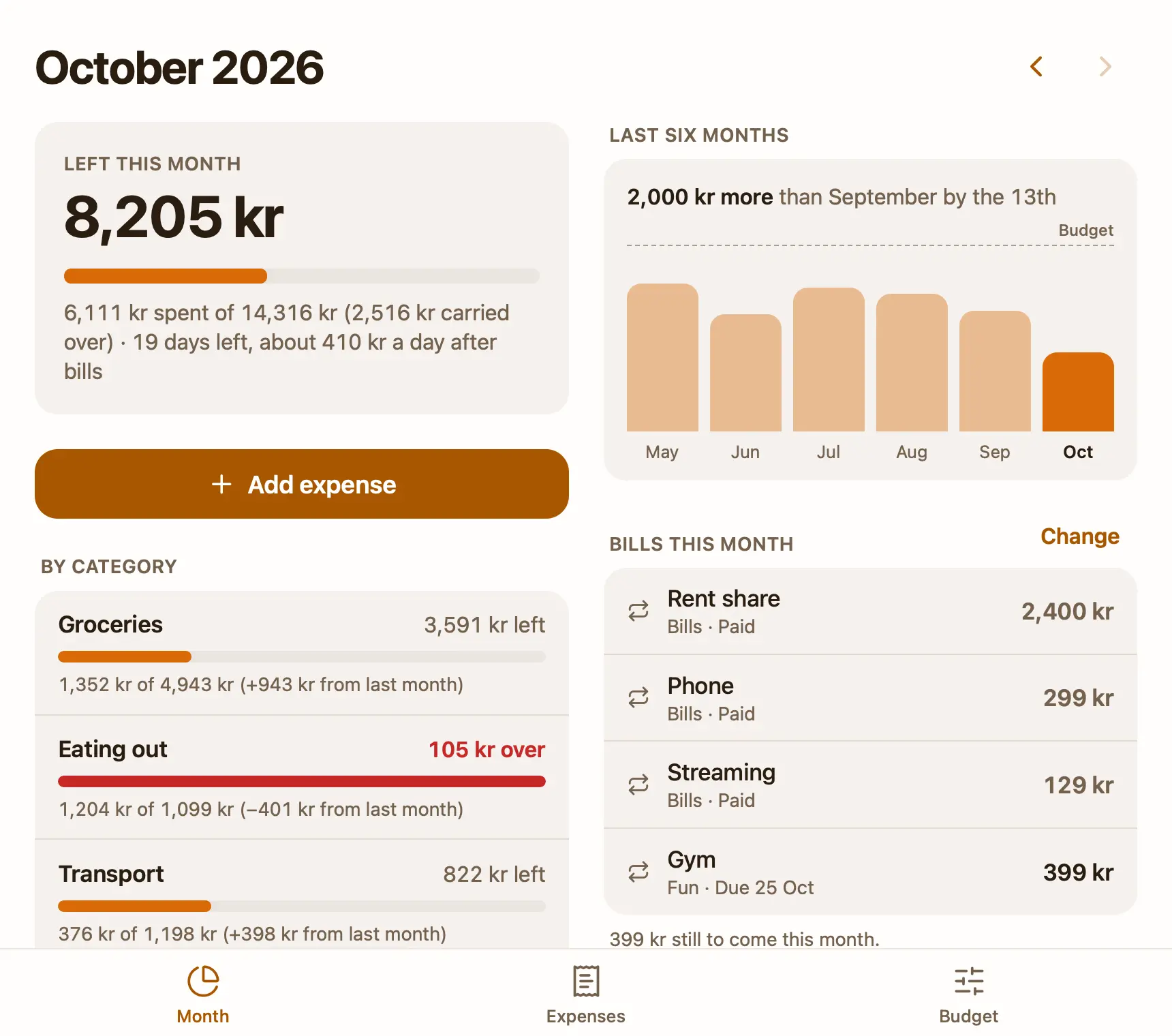
That's why I made Pinto Notes. It looks and works like Apple Notes on iPhone and Mac, and a note can also be a small app. The free Budget and expenses template is one: you set a monthly budget per category once, and it shows what's left this month with a bar, each category against its budget with what rolled over, your monthly bills and the last six months. Add an expense with one tap, and it does the sums.
You can also tell ChatGPT or Claude what you spent, in the chat you already use, and it adds the expense to the note. The app does the maths, not the AI. A budget your AI can keep for you shows how that works.
Your Apple Notes come over in one import on your Mac, and Apple Notes isn't changed.
Questions
Does Apple Notes have a budget template?
No. Apple Notes has no templates at all. You can make a budget note that adds itself up, though: give each amount a name on its own line, then add the names with an equals sign, and Math Results fills in the total.
Can Apple Notes do math?
Yes, with Math Results. Type a sum ending in an equals sign and Notes offers the answer. Named amounts, like Rent = 1200, can be used in later sums, and changing one updates every answer below it.
Why doesn't my budget table in Apple Notes add up?
Math Results doesn't work inside a table. Keep the table for reading if you like, and put the named amounts and the sums as plain lines under it.
Is there a free budget app that works like a note?
Pinto Notes has a free Budget and expenses template: a note that is a small app, with what's left this month, each category against its budget, monthly bills and the last six months. ChatGPT or Claude can add what you spent to it.
Checked against the app on .