Apple Notes trip planner template, bookings to packing


The flight is in one email, the hotel in another, the plan for Saturday in a chat, and the packing list in your head. Apple Notes can hold all of it in one note. Here's a trip template to paste in, three ways to make it work better, and where it stops.

The template: one note per trip
Four days in Lisbon, as an example. Swap in your own trip before you paste: the bookings with their confirmation numbers, one heading per day, and what you always forget to pack. Keep every line with a word in it, because an empty checklist item doesn't survive the paste.
Trip planner for Apple Notes
# Lisbon, 22 to 26 October

## Bookings
- [ ] Flight ARN to LIS, Thu 22 Oct 06:55, ref TP7XQ2
- [ ] Hotel Principe Real, 22 to 26 Oct, ref 88412093
- [ ] Fado dinner, Sat 24 Oct 20:00
- [ ] Flight LIS to ARN, Mon 26 Oct 17:40

## Thursday 22 October
- 06:55 Flight to Lisbon
- 13:00 Lunch at Time Out Market
- 15:00 Check in at the hotel
- 19:30 Sunset at Miradouro da Senhora do Monte

## Friday 23 October
- 09:30 Tram 28 to Alfama
- 12:00 Lunch near the castle
- Afternoon free

## Saturday 24 October
- 10:00 Day trip to Sintra
- 20:00 Fado dinner

## Packing
- [ ] Passport or ID
- [ ] Travel insurance details
- [ ] Phone charger
- [ ] Travel adapter
- [ ] Comfortable shoes
- [ ] Rain jacket
- [ ] Toothbrush
- [ ] Sunscreen

## Ideas
- Bring back tinned sardines
- Ask Maja for her list of bakeries
On a Mac, paste it into a new note with Edit, Paste as Markdown.
Set it up

- Mac
On a Mac with macOS 27, make a new note and choose Edit, Paste as Markdown. The # line becomes the title, each ## line a heading, the bookings and the packing list become checklists, and the plans stay as a list. A plain Command-V keeps the symbols as text. On iPhone, type the lines, select the bookings and the packing list and tap the checklist button.
Tick a booking once it's paid, so the unticked ones are what you still owe. If you'd rather see bookings as a table with columns for the date and the reference, Format, Table makes one; tables in Apple Notes shows how, and what they can't do.
Make it work better
- Mac
- iPhone
- A contents line at the top. On macOS 27 and iOS 27 a link can point at a heading, so the note can start with a link to each day. Type the trip's title under Link To and its headings show up. What's new in Apple Notes in iOS 27 has the details.
- Tickets in the note. On a Mac, drag the PDF of a ticket or a hotel confirmation into the note, under its booking. On iPhone with iOS 27, use Attach File in the edit menu. A note with a file in it can't be locked, so keep passport numbers out of it.
- The same list next time. When you're back, choose File, Duplicate Note, then click in the packing list and choose Format, More, Uncheck All. The copy is the start of the next trip.
If you plan this way often, Apple Notes templates has a packing list and a weekly review to paste in the same way.
Where a trip planner in Notes stops
- No countdown. The dates are words. Notes doesn't know the trip is in nine days, or that today is day two.
- Bookings by hand. Every confirmation email is copied in line by line: the time, the reference, the day it belongs to.
- Days don't sort. Add a dinner to Friday and you find Friday's heading and the right spot in it yourself. Move it to Saturday and you cut and paste.
- No count. How many bookings are still unpaid or how much is left to pack means counting ticks.
For a weekend away, the note is plenty. For a week with flights, trains and a few dinners booked, you end up keeping the plan in order by hand.
A trip plan that keeps count
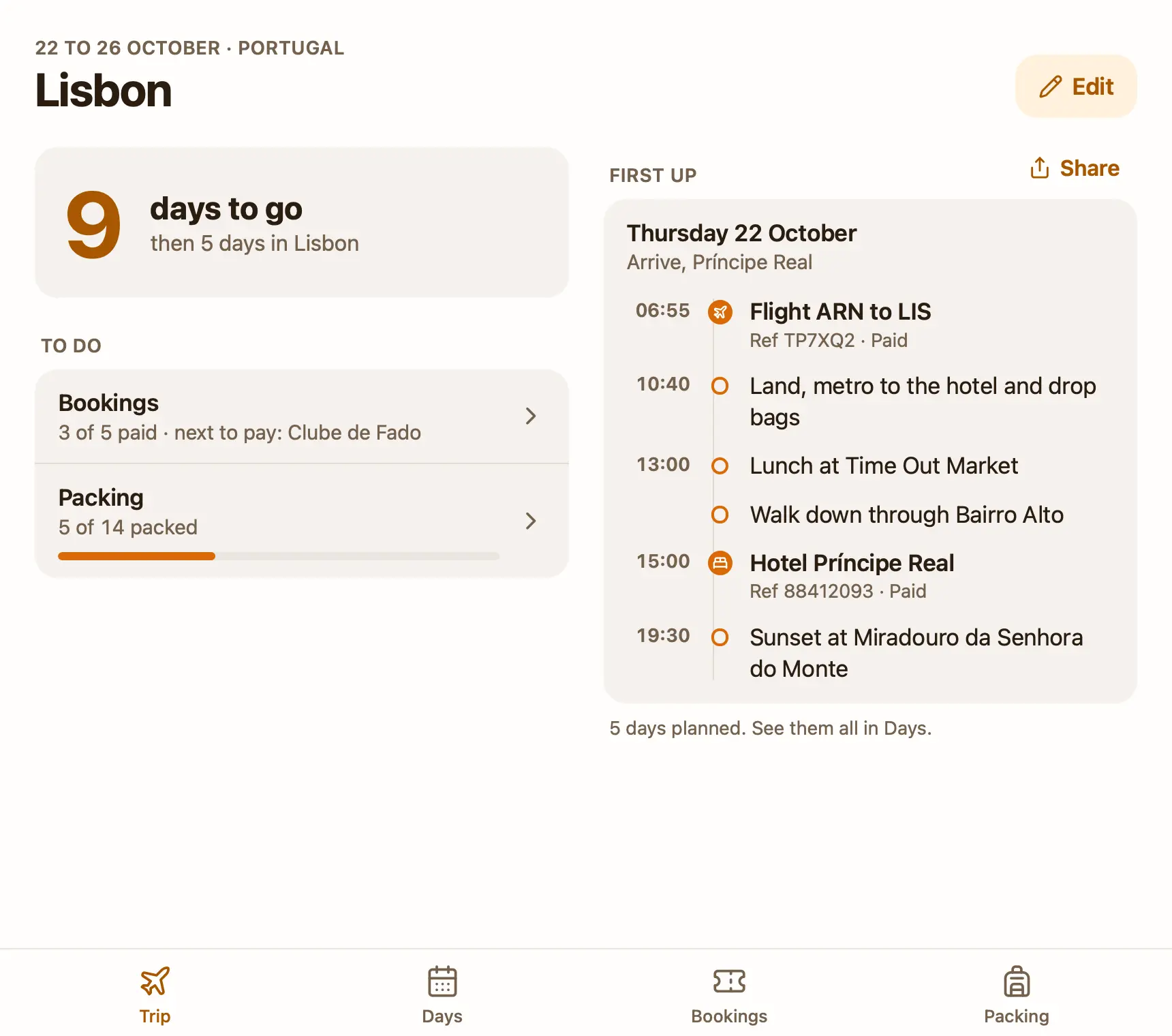
That's why I made Pinto Notes. It looks and works like Apple Notes on iPhone and Mac, and a note can also be a small app. The free trip plan template is one. You say where you're going and when, and it counts the days down, then shows which day of the trip it is. Each day is a timeline with its bookings in place. Bookings have a kind, a time and a reference, and a tick once paid, so it says what's left to pay. The packing list is grouped, one tap per item, and a new trip keeps it.
You can also paste a booking confirmation into ChatGPT or Claude, in the chat you already use, and it adds the booking to the right day. Ask what you still need to book and it reads the plan to answer. Connecting ChatGPT takes a minute.
Your Apple Notes come over in one import on your Mac, and Apple Notes isn't changed.
Questions
Does Apple Notes have a trip planner template?
No. Apple Notes has no trip planner and no templates. One note with a heading for the bookings, a heading for each day and a packing checklist works as one, and you can paste the template on this page straight in.
Can I keep my tickets in Apple Notes?
Yes. On a Mac, drag the PDF into the note. On iPhone with iOS 27, Attach File is in the edit menu. One catch: a note with a file attached can't be locked.
How do I reuse a packing list for the next trip?
Duplicate the note with File, Duplicate Note, then click in the packing list and choose Format, More, Uncheck All. Change the dates and delete the old days.
Is there a free trip planner that works like a note?
Pinto Notes has a free trip plan template: a note that is a small app, with a countdown, each day as a timeline, the bookings with a tick for paid, and a packing list. ChatGPT or Claude can add a booking you paste to it.
Checked against the app on .